
I didn’t plan to build a Mac app today.
I just wanted to get through a normal afternoon — until I got that familiar call again:
“Hey… my Mac says the disk is full again. I didn’t even install anything!”
It’s not the first time.
Actually, it’s been happening a lot lately.
🎬 It All Started With Video Editing
My wife’s been really into video editing recently — she’s putting together little clips for family trips, special events, and even a side project she’s been exploring.
It’s awesome to watch her in creative mode.
But you know what’s not awesome?
macOS popping up every few days to say: “Your startup disk is almost full.”
And every time that happens, she calls me。
“Can you help dig it??”
🧑💻 As a Developer, I Knew the Answer
I’d sit down at her desk, open Terminal, and type:
du -sh * | sort -hr
Boom. The culprit folder shows up instantly.
Most of the time it’s the Downloads folder, or some temporary files from her editing app. A quick delete, and we\’re good.
But she has no idea how to use Terminal.
And honestly, she shouldn’t have to.
So today, while I was cleaning up her disk for the third time this week, I thought:
“Why don’t I just build her a little app, so she can see the space usage herself?”
🧠 The Idea Was Simple
- One window
- Shows folder sizes in a table
- Click “Refresh” to update
- No command line, no setup, no stress
Just like the du -sh * | sort -hr command I always use — but wrapped in a clean, simple UI.
So I opened my editor and got to work.
🛠️ How I Built It (In Under 2 Hours)
I chose Python + PyQt5 for one reason: speed.
I didn’t want a complex app, just something that worked.
I wrote a small function to run the disk check command behind the scenes:
import subprocess

def get_folder_sizes():
    result = subprocess.run(
        [du, -sh, *],
        stdout=subprocess.PIPE,
        stderr=subprocess.PIPE,
        text=True,
        shell=True
    )
    return sorted(result.stdout.splitlines(), reverse=True)
Then used QTableWidget to display the results:
self.table.setRowCount(len(data))
for row, line in enumerate(data):
    size, name = line.split(\'\\t\')
    self.table.setItem(row, 0, QTableWidgetItem(size))
    self.table.setItem(row, 1, QTableWidgetItem(name))
Finally,put “Refresh” button to update data:
refresh_button.clicked.connect(self.update_table)
That’s pretty much it.
No backend. No database. Just real-time disk usage, in one click.
🖼️ What It Looks Like

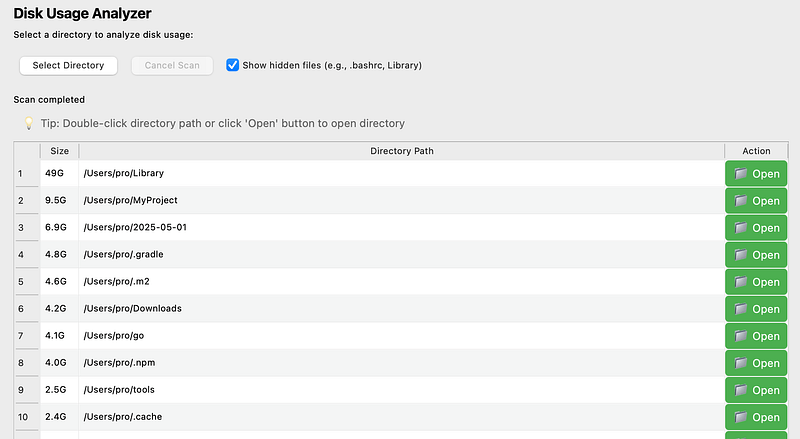
A clean table that shows all folders in the current directory, sorted by size. Exactly what I needed.
🧳 I Wanted It Clickable — So I Packed It Up
Since my wife doesn’t use Python, I used pyinstaller to turn it into a .app file:
pyinstaller --onefile --windowed mytool.py
Of course, nothing is ever that simple —
I ran into this annoying pip warning:
WARNING: pip is being invoked by an old script wrapper...
Apparently, my Python setup on macOS was outdated. I fixed it by upgrading pip and calling it like this:
python3 -m pip install --upgrade pyinstaller
python3 -m PyInstaller mytool.py
Then I handed my wife a ready-to-use .app file she could just double-click.
No Terminal. No help needed. She smiled.
Mission accomplished.
💬 Why This Tiny Tool Mattered
I didn’t build this to change the world.
I built it because one person I love was frustrated — and I could fix it.
And along the way I realized something:
Most powerful commands we use as devs…
are completely invisible to normal people.
But they don’t have to be.
Sometimes, wrapping a little terminal magic in a GUI is all it takes to make someone’s day easier.
That’s real engineering, too.
👋 Final Thoughts
My wife no longer waits for me to come home and fix her Mac.
She just clicks, sees what’s eating space, and clears it herself.
I call that a win.
And the next time you think,
“Someone should build a tool for this…”
Maybe that someone is you.
Even if it’s just for one person.