
A No-BS Report Based on 230+ Real User Comments
Why This Review Exists
After digging through 230 real Medium comments, I realized something:
Most of those articles claiming “100% free forever” cloud servers? They’re either overly optimistic (and hide the risks) or completely outdated.

Very few are based on real-world feedback at scale. So I wrote the report I wish I had when I started.
A Letter to Everyone Who Got Rejected by Oracle
“Oracle rejected you? Good. That might be the best thing that’s ever happened to you.”
I’ve failed Oracle’s signup process multiple times. And if that’s you too, let me say this:
Don’t cling to one tree. Learn to love the whole forest.
Yes, Oracle sounds great: forever free, solid performance, beefy specs.
But getting in? It’s a lottery. Some get approved on their first try. Most get rejected again and again.
Instead of banging your head on Oracle’s signup page, zoom out.
AWS, Azure, and GCP all offer 12-month free trials. Use them back-to-back and you’ve got 3 years of free cloud services.
And honestly, three years from now? You won’t care about “forever free.” You’ll have a steady income. Your skills will have leveled up. You’ll realize the real win wasn’t in chasing free tools — it was in learning how to pick the right tools.
This article will save you 10–20 hours of trial and error, $24–50/year in surprise charges, possible data loss — and show you there’s more to cloud than just Oracle.
Real Sources Only:
Medium Comment Analysis:
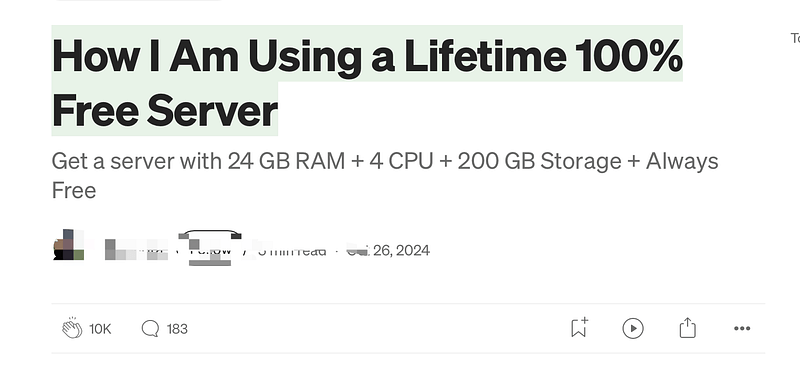
- Article 1: “How I Am Using a Lifetime 100% Free Server”
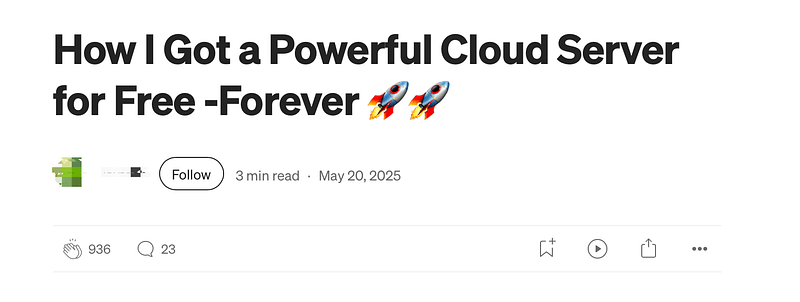
- Article 2: “How I Got a Powerful Cloud Server for Free — Forever 🚀🚀”
- Total Comments Analyzed: 230 (184 main + 46 replies)
- Data Includes: Success/failure stories, technical issues, risk warnings
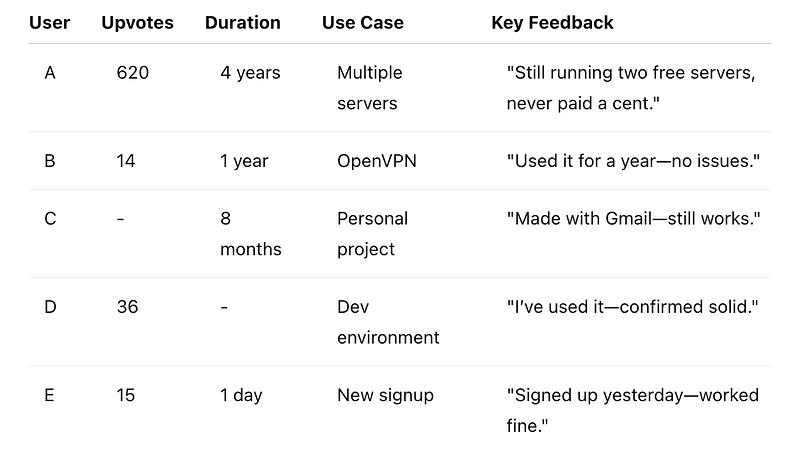
Long-Term Success Stories
Why Most Users Fail to Register
1. Credit Card Issues (Most Common)
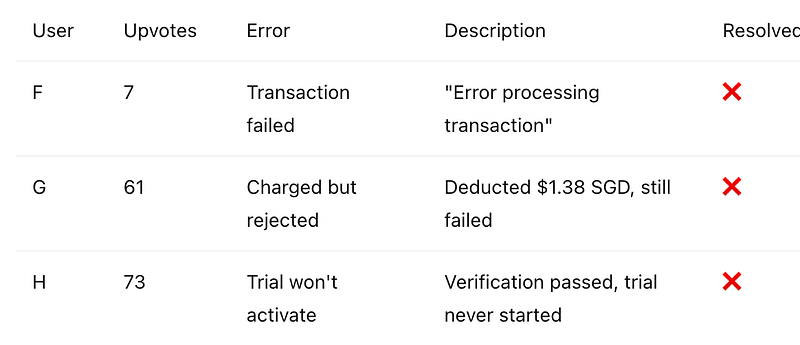
Solution (What Actually Worked):
- User I (37 upvotes) + User J (30 upvotes) confirmed:
- Upgrade to Pay-as-you-go
- Oracle charges $100 (refundable)
- Use verified YouTube tutorials
2. Email Discrimination
User K (65 upvotes) discovered:
- Personal emails (Gmail, Yahoo) = 100% fail
- Corporate emails = better odds
- Still partially luck-based
3. Prepaid/Virtual Cards Blocked
- User L: Prepaid card rejected
- Multiple reports: Real credit or debit card required
Quality & Risk Reports
Hardware Downgrade Case
User M (230 upvotes) said:
- Used to have ARM 4CPU + 20GB RAM
- Now: Just 1 Intel CPU + 1GB RAM
- Triggered by account alert — no Oracle support response
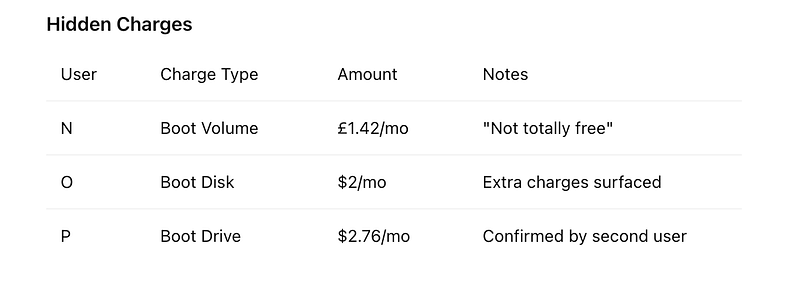
Accounts Ban
- User Q (116 upvotes): Banned for using as GitHub Action runner
- User R: Entire monitor setup disappeared overnight
- Oracle support: Tickets closed, no replies
Cloud Providers Compared
Latest Official Specs Side-by-Side
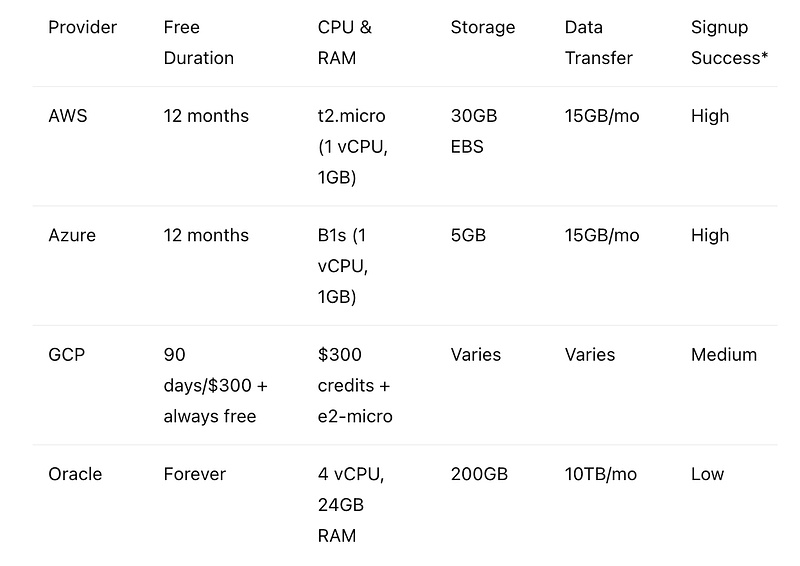
*Signup success is user-reported, not statistically precise.
1. AWS Free Tier: The Enterprise Pick
Specs:
- t2.micro (1 vCPU, 1GB RAM) — 750 hrs/month
- 30GB EBS SSD
- 15GB outbound/mo
- 12 months (new users only)
Pros:
- Smooth signup, high success rate
- Stable, rarely bans users
- Strong support
- Huge learning ecosystem
Cons:
- Low config
- Only free for 12 months
- Higher costs if you go beyond the free tier
Best For: Beginners, learners, enterprise trials
2. Microsoft Azure: The Balanced Choice
Specs:
- B1s (1 vCPU, 1GB RAM) — 750 hrs/month
- 5GB hot blob LRS
- 15GB outbound/month
- 12 months (new users only)
Always Free Perks:
- App Service: 10 web apps
- SQL DB: 10 DBs
- Functions: 1M executions/mo
Pros:
- Integrates with Windows stack
- Enterprise-grade security
- Decent always-free services
Cons:
- Complex UI
- Some features limited in China
3. Google Cloud Platform: The Tech Leader
$300 Free Trial:
- $300 credits for 90 days
- Access to all GCP services
- Flexible VM configs
- No GPU or Windows Server
Always Free Tier:
- e2-micro (2 shared vCPU, 1GB RAM)
- US-only regions (3 regions)
- 30GB persistent disk
- 1GB/mo free outbound (North America only)
- BigQuery: 1TB/mo free queries
- Cloud Functions: 2M free invocations
Pros:
- Advanced tech (esp. AI/ML)
- $300 + always free combo
- Top-tier data tools
- Full platform access during trial
Cons:
- US-only regions for always free
- Low-performance config
- High post-trial costs
4. Oracle: Where Oracle Stands Now
The Good:
- Generous config if approved: 4CPU + 24GB RAM
- Verified long-term users exist (4+ years)
- Decent free limits
The Ugly:
- Very low approval rate
- Unstable service (downgrades, bans)
- Poor support
- Surprise billing
- Widespread trust issues
Still Want Oracle? Here’s What to Do
Tips to Boost Approval Odds:
- Use a corporate email
- Be ready to pay $100 verification (refundable)
- Real credit card only
- Pick underused regions
- Always have a backup plan
Risk Management:
- Backup regularly
- Don’t store critical data
- Plan for future migration
- Monitor account constantly
Final:
There’s no such thing as a truly free lunch. Every “free” service has a cost. The real question is — are you ready to pay it, and do you know what it is?
Even more important: Don’t let “free” become your cage.
If Oracle didn’t let you in, maybe the universe just did you a favor.
You’ve got better options — AWS, Azure, GCP.
They won’t trap you with hidden fees. They won’t vanish your data overnight.
Real wisdom isn’t about chasing forever-free. It’s about knowing when to pay for what matters.
Pay with intention. Choose with clarity.
And keep building.
If you’ve had wins (or war stories) with free cloud services, drop them in the comments. Let’s learn from each other.